



In our previous article, “Google Gemini’s SynthID – a hidden trap for autoblogging“, we explained Google’s SynthID watermarks and recommended using third-party spinners and CyberSEO Pro’s built-in synonymizer. These methods are effective, but the effectiveness of a synonymizer is always limited by the quality of the synonym table. Guaranteed results require maximum coverage of the vocabulary in the processed texts; otherwise, the statistical skeleton may remain.
It is also not always possible to completely abandon the use of Google’s language models, because despite the presence of a watermark, Google Gemini has two undeniable advantages: impressive free limits (Free Tier) and a colossal input context window of up to 1 million tokens. All this allows Gemini to be used for in-depth analysis of huge amounts of data – for example, full transcripts of YouTube videos (which CyberSEO Pro can import automatically) – and to generate reviews, abstracts, or unique articles based on them.
As practice shows, the simplest and most effective method of removing SynthID watermarks is to use a linguistic barrier based on the principle of generating text in an intermediate language and then translating it into the target language. The vulnerability to this approach is directly addressed in the official Google SynthID Text Limitations documentation, as well as in the scientific paper “Can Watermarks Survive Translation?”
As practice shows, the simplest and most effective method of removing SynthID watermarks is to use a linguistic barrier based on generating text in an intermediate language and translating it into the target language. This approach’s vulnerability is addressed in both the official Google SynthID Text Limitations documentation and the scientific paper Can Watermarks Survive Translation?
Choosing a language bridge
To remove SynthID, you need to create differences between the syntax of the intermediate text, i.e. the source text, and its final version in the target language. Using closely related languages (e.g. German-English) carries risks due to the similarity of structures. Pairs that are too exotic (Japanese-English) can lead to semantic distortions. It is best to use Romance or Slavic languages.
| Strategy | Language Pair (Example) | Watermark Removal | Final Quality | Outcome |
|---|---|---|---|---|
| Minimal | German → English | Low | Excellent | Risky |
| Optimal | Spanish → English | High | High | Best Choice |
| Radical | Japanese → English | Maximum | Medium/Low | Niche use |
How to configure CyberSEO Pro
Since all the tools we need are available in the plugin out of the box, implementing this scheme in the plugin boils down to two simple steps:
- In the text generation prompt, add an instruction for Gemini to generate text in your chosen intermediate language (e.g., Spanish).
- Go to the Advanced of the feed settings and select your preferred tool from the Translation drop-down menu: DeepL Translate, Yandex Translate, or AI Translate.
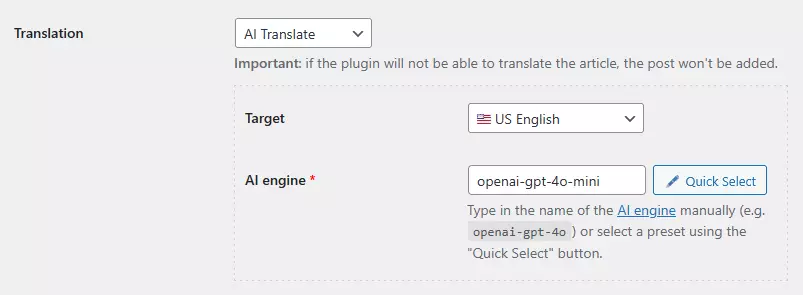
Please note that you should not use Google Translate, as it is part of the Google ecosystem and can theoretically preserve the watermark structure during translation, which would negate your efforts to clean it up. Although we have no evidence to confirm this, it is better to be safe than sorry.
When selecting AI Translate, you will need to choose a translation model. You should definitely not choose AI language models from the Google Gemini family here, either. Any other model that does not use SynthID will work well, such as OpenAI GPT (even the budget GPT-4o mini), DeepSeek, or Anthropic Claude. The most important thing is to ensure the model is compatible with your source and target languages.
Although professional services like DeepL and Yandex require payment, the OpenRouter service offers free access to several powerful AI translation models. Together with the free Gemini API, it enables you to create a fully autonomous and secure content production pipeline.
Google Gemini’s SynthID – a hidden trap for autoblogging
