



If you’ve ever tried to import an RSS feed, article, or media file and been blocked by Cloudflare or an IP ban, then you know the problem. Web servers are on the ball, frequently using strong anti-scraping measures, like geoblocking and JavaScript browser checks, that immediately reject automated requests. To get around these roadblocks, the CyberSEO Pro and RSS Retriever plugins now have a special Use Wayback Machine option.
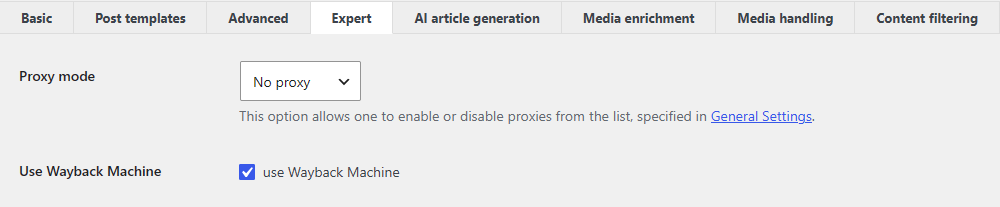
If the plugin cannot access the feed, article text, or image directly due to anti-bot measures, it automatically redirects the request to the Internet Archive’s Wayback Machine archives and retrieves the most recent saved copy from there. This provides a transparent way to bypass anti-scraping measures, since the archive’s crawlers regularly index most public websites and have a high reputation, easily passing checks that are inaccessible to ordinary scripts.
This feature actually saves a lot of money on paid rotating proxies or CAPTCHA bypass services because the Wayback Machine works as a reliable and free global cache. It also guarantees uninterrupted content import, even when the target site is temporarily unavailable, undergoing maintenance, or blocking your server. This option is also excellent for bypassing hotlinking restrictions and protected direct links to images, allowing you to download media files from a saved snapshot without any issues.
Despite the effectiveness of this method, it is extremely important to keep in mind that the Internet Archive is a public service with fairly strict API usage rules. The Wayback Machine allows no more than 15 requests per minute, and during peak hours on the archive’s servers, this limit may drop to 6 to 10 requests. If this threshold is exceeded, the system automatically blocks your hosting provider’s IP address. Such a temporary ban can last anywhere from five minutes to a full day, and during that time, any requests to the archive will be rejected.
In this regard, if you enable the Wayback Machine as a fallback and plan to process multiple feeds or large content sources at once, the risk of hitting limits increases. To avoid automatic blocking of your server’s IP address, we strongly recommend using the built-in Delay option in the plugin settings. Setting a short pause of a few seconds between processing feeds and running automated tasks will help distribute the flow of requests evenly over time.
